
The admin panel
The first screen, and the whole system on it
Not a wall of charts nobody reads. A list of what this installation has, what each part holds, and one button to add or remove any of it.
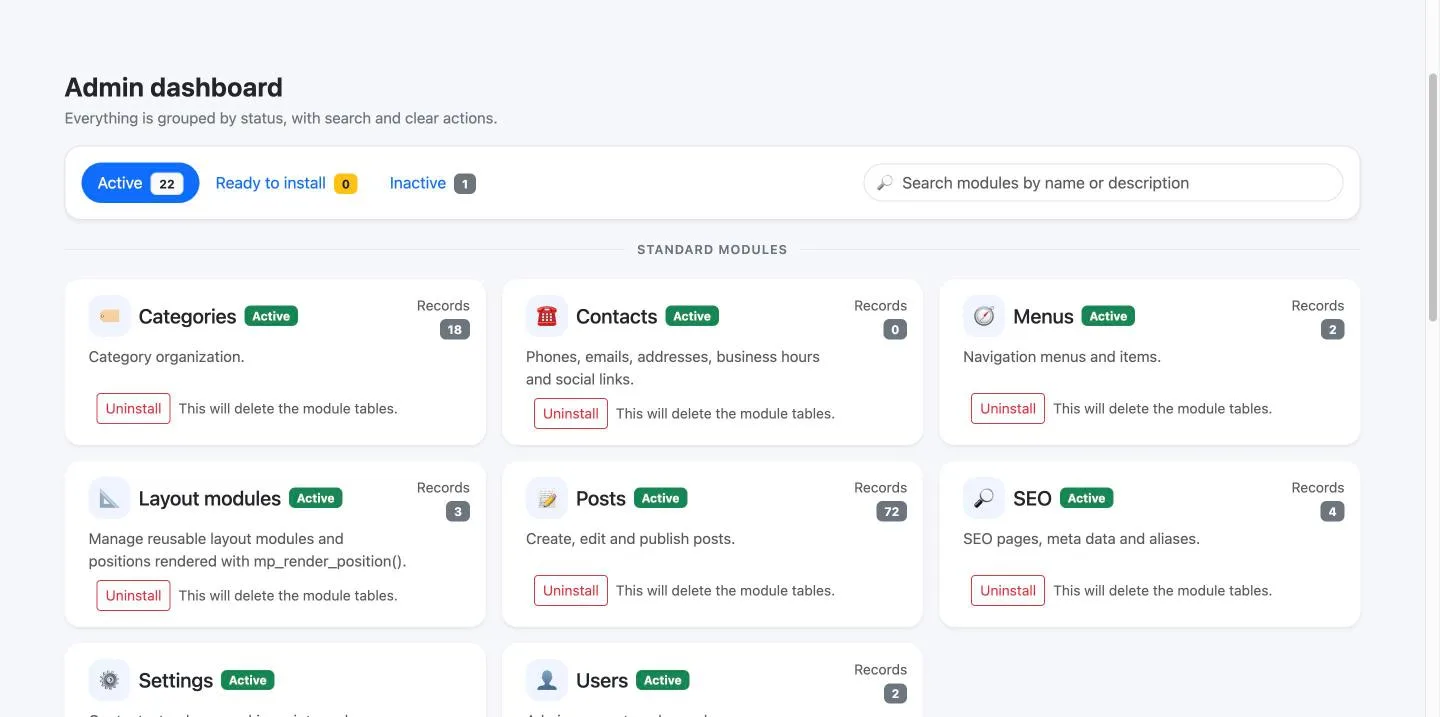
Active, ready to install, inactive
Three tabs with a count on each, a search box, and every module as a card. Clicking the image opens a full size preview.
Three columns, and the order is a decision
Eight, eight and seven. The grouping drives both these columns and the order of the buttons across the top of every screen, so learning one teaches the other.
Standard
What every site uses on day one: users, posts, categories, menus, contacts, settings, SEO and layout modules. Content, navigation and configuration.
Advanced
What a live site switches on: security, two-factor sign-in, redirects, analytics, reviews, questions, videos and the gallery.
Extended
Selling, customers and the world outside: orders, customers, chat, Telegram, the API, locations and answer engine optimisation.
Adding a module, and removing one
A module is installed from here: it creates its own tables and its own permissions, and appears in the navigation. Uninstalling it drops those tables, and the card says so in plain words before you press anything — because that is a sentence somebody should read twice.
Both refuse a read-only account outright, before anything else runs. A module screen opens on its view permission and writes only with its edit permission, so a colleague can be given the reports without being given the buttons.
At a glance
- Modules: 23
- Columns: standard, advanced, extended
- Per card: state, description, record count
- Search: by name or description
- Read-only account: refused, by method
You can press everything on it yourself
The demo opens on this screen. Nothing you press changes this site: the account holds the view permissions and nothing else, and the panel refuses any request from it that would write. Look at all of it — that is what it is there for.